

Gmail is becoming feature rich day by day, though this is not the latest feature but i missed it but it’s never too late to write a good post.
This is great news for all gadgets lover now you can add gadgets to your Gmail account, and that is something many of you like me are waiting for.
How to enable Gmail gadget feature?
Go to your Gmail lab by clicking lab icon at the top of Gmail
Enable “add any gadget by URL” by clicking on the enable at the right of it.

Once enabled, go to your Gmail settings, under settings you will see link for gadget click on it

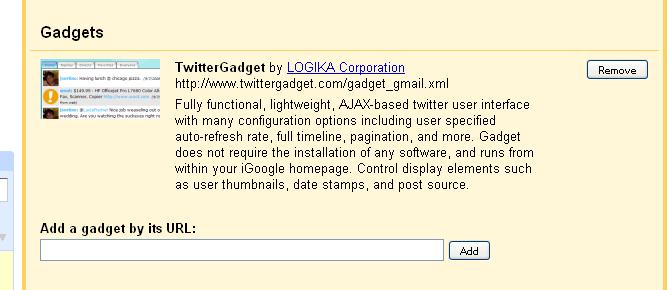
you will see an option to add gadget using URL, something like this

Now head over to the link for Google gadgets:
Select your desired gadget and click on share this gadget.
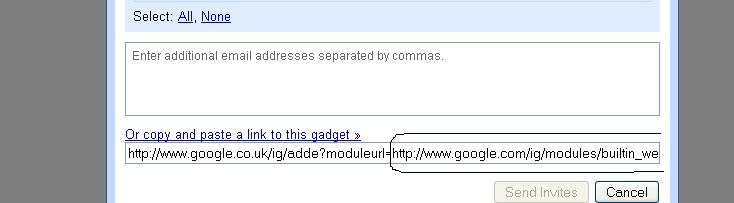
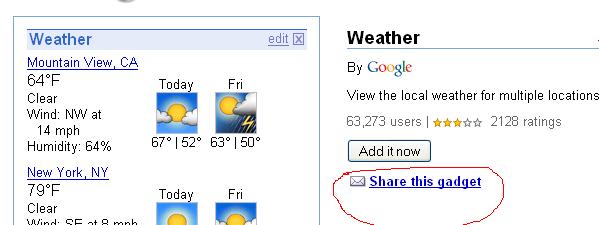 under that click on copy or paste a link to the gadget and copy the URL ending with xml
for example
http://www.google.co.uk/ig/adde?moduleurl=http://www.google.com/ig/modules/builtin_weather.xml&source=imag
 Now add the link ending with .xml to the gadget tab under setting of Gmail.
Now you will have your desire gadget on the sidebar of your Gmail.

No comments:
Post a Comment